
What is this feature and how does it help you?
You can adjust the price of an existing membership, up or down, without creating a new one. Once you save the change, the new amount is used for every future renewal of that membership.
Where to find the option
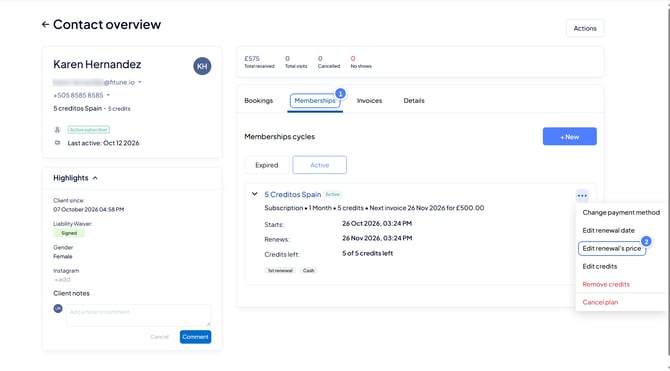
- In the admin panel, go to Contacts and open the client's profile.
- Open the Memberships tab and find the membership you want to change.
How to change the renewal price
- Click the three-dot menu (⋯) next to the membership name.
- Select Edit renewal price.
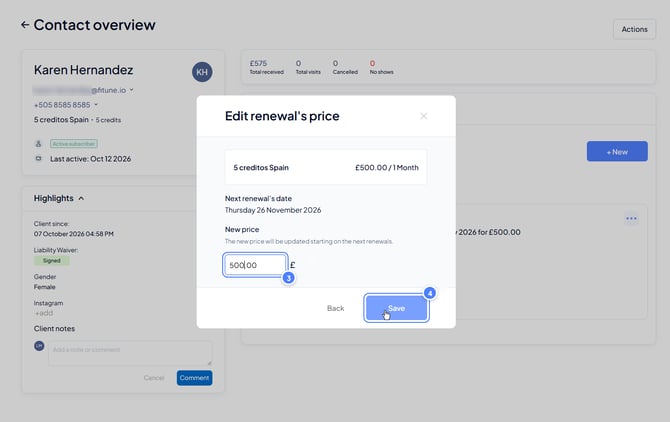
- Enter the new amount in the New price field.
- Click Save.
What happens after the change?
- The new price applies to all future renewals of that membership.
- You don't need to repeat the change every cycle. It stays in place automatically.
Where is the change saved?
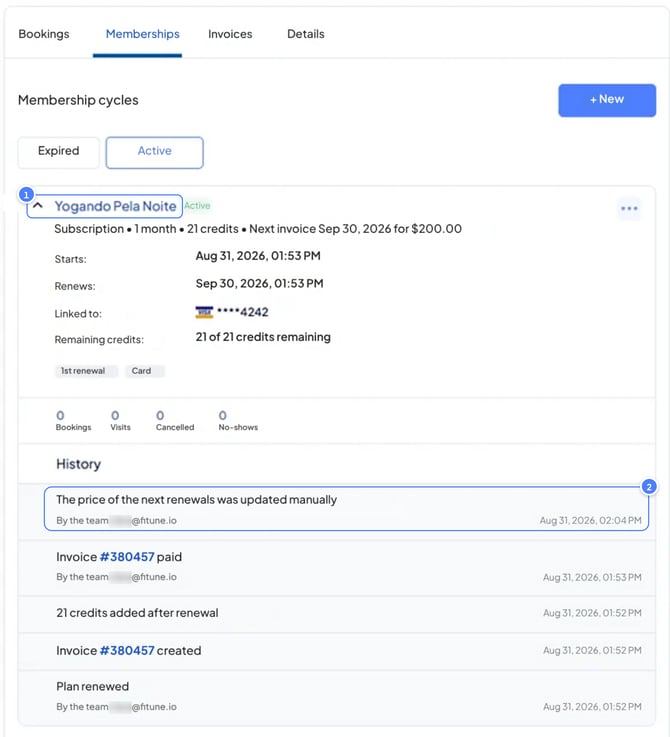
Every change is recorded in the membership's History, with the name of the admin who made it and the date and time.
To see it, open the client's membership in the Memberships tab and scroll to History.
Why does it matter for studio owners?
- Flexibility: change the price of an individual membership without affecting other clients.
- Transparency: every change is recorded, so you always know who changed the price and when.