
What is Fitune Pay?
Fitune Pay is a payment gateway that lets you easily process card payments for your business. It works just like Stripe or Mercado Pago, but is built specifically to bring the lowest transaction fees for fitness and wellness businesses in Mexico.
Why Fitune Pay?
Besides bringing you the lowest fees, we built Fitune Pay to help businesses automate payments, boost sales, and reduce missed charges.
A growth tool, not a cost. Businesses that automate their payments online make more sales and profit thanks to fewer failed transactions, better renewal rates, and faster checkouts.
- Automatic recurring payments so you never miss renewals.
- Reduce failed payments with smart retries and reminders.
- More sales with faster checkouts and higher conversion rates.
- Simple setup — no tech skills needed.
Think of it as an investment to grow your revenue, not a cost.
Fitune Pay Transaction Fees
| Card Type / Service | Fee |
|---|---|
| Standard Domestic cards | 2.97% + MXN$3 |
| AMEX Domestic Cards | +0.5% |
| International cards | +1.7% |
| Auto recurring payments | +0.75% |
| Account creation | Free |
| Monthly Fee | Free |
Prices exclude IVA (VAT).
Where can I use Fitune Pay?
Fitune Pay is fully integrated into your Fitune platform:
- On your website and client app — process bookings, memberships, packs, appointments, and shop purchases automatically.
- Digital Point of Sale (POS) — take payments in person directly from your Fitune Admin for walk-ins or over-the-counter sales.
- Custom payment links — create and send personalized payment links to clients for quick and easy checkout.
Made for the Mexican fitness community
Fitune Pay is only available in Mexico, and it's exclusively for Fitune-powered studios. That means we can negotiate the best possible rates and keep your payments local, fast, and cost-efficient.
Safe, reliable, and powered by Stripe
Fitune Pay is powered by Stripe's global infrastructure — the same platform trusted by millions of businesses worldwide. You get all the reliability, fraud protection, and compliance standards, with better pricing for your market.
Other Fees: Platform Fees
| Plan | Platform Fee | Fitune Pay Fees |
|---|---|---|
| Free Forever | 6% | Fitune Pay fees apply |
| Pro | 2% | Fitune Pay fees apply |
| Plus | 0% | Fitune Pay fees apply |
| Ultra | 0% | Fitune Pay fees apply |
Platform fees are charged separately from Fitune Pay transaction fees. Prices exclude IVA.
How to get started
- Go to your Fitune Admin → Settings → Payment Gateway. Or click here
- Click on Connect Account under Fitune Pay.
- You'll be taken to a Stripe account creation flow — your special Fitune Pay rates are applied automatically and instantly.
- Complete your business details (it only takes a few minutes).
After completion you can start accepting payments instantly.
Create Fitune Pay Account
Payout Schedule
MX studios using Fitune Pay can configure how often their payout cycles are processed directly from the Fitune admin.
Where to find it: Settings → Payment Gateway → Fitune Pay → Configure → Payout Schedule
| Frequency | Available on |
|---|---|
| Monthly (30th of each month) | All plans |
| Twice a month (15th and 30th) | All plans |
| Weekly (every Monday) | All plans — default for everyone |
| Every 3 days (~10x/month) | Plus and Ultra only |
| Every 2 days (~15x/month) | Ultra only |
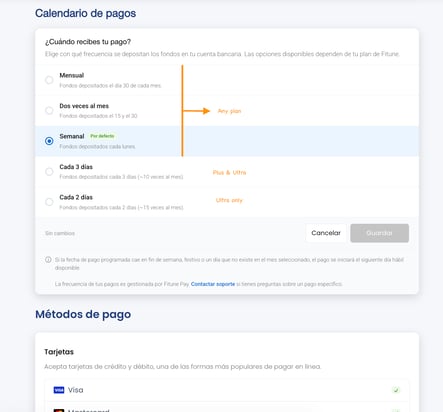
Important notes:
- Options outside your current plan will appear locked with an upgrade prompt.
- Once saved, your payout schedule syncs automatically to Stripe — no need to make changes directly in Stripe.
- If you downgrade your plan and lose access to your saved payout frequency, your schedule will be automatically reset to Weekly.
- If your scheduled payout date falls on a weekend, public holiday, or a calendar day that doesn't exist in the selected month, your payout will be initiated on the next available business day.
When does the money arrive in my bank account?
It's important to distinguish between two concepts:
- Payout schedule — defines how often payout cycles are processed. This is what you can configure from Fitune Pay.
- Deposit time — how long it takes for funds to arrive in your bank account after each payout cycle. This depends on your region and is managed by Stripe, not Fitune.
In Mexico, the deposit time is generally 3–5 business days after each payout cycle. Over time, Stripe may reduce this timeframe based on your account's history and performance:
- Transaction history — the volume and consistency of processed payments.
- Operating history — your account should have a meaningful period of activity.
- Dispute ratio — a low number of chargebacks relative to your processing volume.
- Compliance — your account must be verified and have up-to-date information.
- Processing volume — a higher processing volume may increase the likelihood of faster deposit times.
This process is managed entirely by Stripe and may improve over time as your account grows.