
This is part of the Attract pillar of your Fitune Health Score — your Google Business Profile is often the very first thing a potential client sees about your studio, before they ever visit your website.
Unlike most of the other points in your Health Score, this one isn't configured inside Fitune at all — your Google Business Profile is managed entirely through Google's own site, at business.google.com.Here's what to check and set up there.
It's also a requirement if you want to use Reserve with Google to let clients book directly from Google Search and Maps.
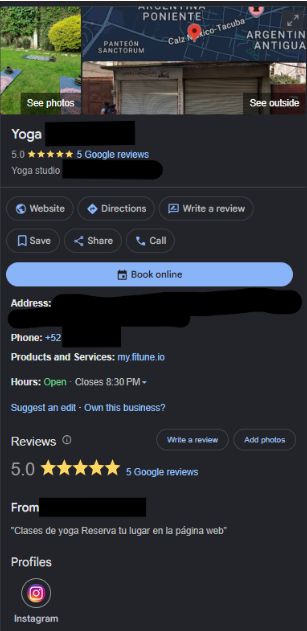
Claim or Create your profile
You need a profile before you can edit anything on it. The process is free.
Which one do you need?
- Claim: take over a profile that already exists. Google sometimes creates a basic one on its own.
- Create: start a brand new profile.
- Either way, you end up with the same kind of profile to manage.
If your studio has no profile yet (create)
- Go to business.google.com/add.
- Select "Add your business to Google".
- Fill in your business details.
If a profile exists but isn't claimed (claim)
- Search your studio by name and city on Google Maps.
- Select "Claim this business" → "Manage now".
- Pick a verification option.
- On the Google Maps app: search your business, tap "About", then choose the claim option.
Verify ownership
- Google picks the method for your business:
- phone call or text code
- mail (a physical code, which can take up to 14 days)
- sometimes a live video call showing your space
- After you submit, Google can take up to 5 business days to confirm.
For the exact, up-to-date steps:
Add or claim your Business Profile and Verify your business on Google
Link your own website
Once you're in your profile, make sure your website field points to your Fitune site — this is a direct, clickable link Google shows right on your profile, and it's one of the easiest ways to send profile visitors straight to your booking page.
If you haven't built your Fitune website yet, it's included across all Fitune plans (Pro, Plus, and Ultra) — your onboarding team can help confirm your plan covers the homepage service and walk you through it.
Check out Design Your Website with the New Website Builder to get one up before linking it here.
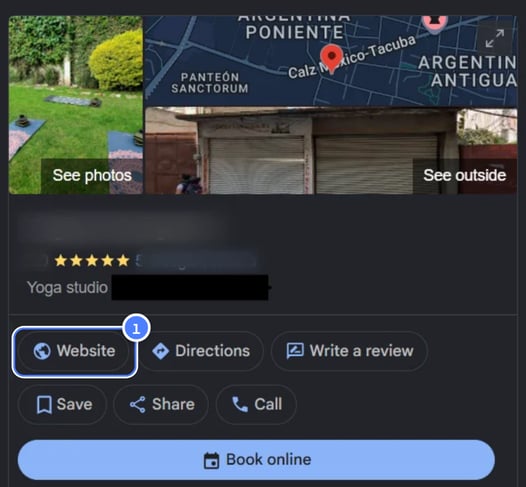
Set your main category to an approved fitness category
Why it matters
- Your category tells Google what kind of business you are, so it affects which searches you show up in.
- Pick the most specific match. For example, choose "Yoga studio" or "Pilates studio" instead of a generic "Gym", if it fits better.
- The category must also be one that Google approves for Reserve with Google. Getting it right unlocks that integration.
How to change it
- Open your Business Profile.
- Click Edit profile.
- Find Business category and click Edit.
- Update your primary category, and add or remove additional ones.
What to expect
- Google may ask you to re-verify your business after a change.
- This is normal. It doesn't mean something went wrong.
Google's guide on this: Manage your business category.
Write a description that mentions at least two of your services
Your profile description is a short paragraph where you introduce your studio to anyone who finds you on Google. Think of it as your studio's mini pitch — it's often one of the first things a potential client reads about you, right there in the search result, before they even visit your website.
You'll find it inside your Business Profile: click Edit profile, then look for the section called "From the business."
A few simple things to keep in mind:
- Name at least two specific things you offer — for example, "Pilates mat classes and 1-on-1 personal training" — instead of something vague like "a great fitness studio."
- Why it matters: the more specific you are, the easier it is for the right person to recognize that you offer exactly what they're looking for, and it also helps Google show your studio for the right searches.
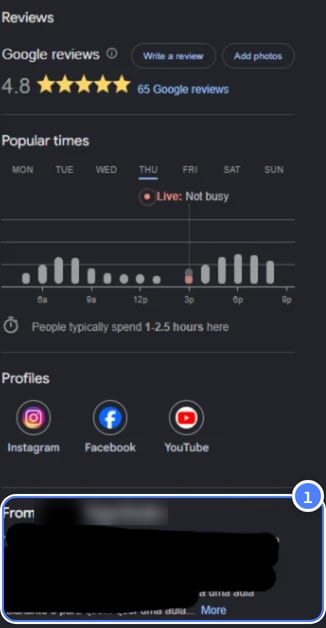
Google's guide: Edit your Business Profile.
Set your hours for every day of the week
Make sure your business hours are filled in for all seven days — including days you're closed, marked as closed rather than left blank. Incomplete hours are a common reason profiles look unreliable to both Google and potential clients.
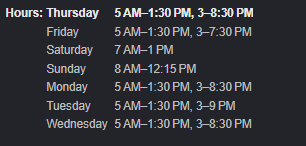
Google's guide: Edit your business hours.
Add your phone number
Make sure a working phone number is listed on your profile. It sounds small, but it makes a real difference: a phone number is one of the first things people check to feel like a business is legitimate and reachable, and it also lets Google show your studio in "call" shortcuts on mobile — someone searching for a studio can tap to call you directly from the search result, without ever opening your website.
Keep in mind a couple of practical points:
- Use a number that's actually answered — a landline or number nobody checks can hurt more than help, since missed calls from potential clients are lost bookings.
- Make sure this number matches the one shown on your website and anywhere else your studio is listed (this ties back to keeping your name, address, and phone number consistent everywhere, mentioned in the SEO article too).
Google covers this in the same guide as the rest of your basic info: Edit your Business Profile.
Add at least 10 photos, with your most recent ones from the last 12 months
Add at least 10 photos, with your most recent ones from the last 12 months
Profiles with more (and more recent) photos tend to get more clicks and direction requests — photos are often what convinces someone to pick your studio over the next search result, before they've even read a single word.
To add photos: search for your studio's name and city on Google, click Photos, then Add photos, and select the images you want to upload.
There are three types worth thinking about separately:
-
Logo
-
Cover photo
-
Business photos
Aim for at least 10 photos total, covering your space, your classes, and your team, and make sure some were added within the last year — profiles that only show old photos can make a studio look inactive, even if it isn't.
Google's guide: Manage your Business Profile photos & videos.
Work toward a 4.5+ rating and enough reviews to compete locally
Your goal
- Rating of 4.5 stars or higher.
- Review count on par with nearby studios, or 50+ reviews if you're not sure what's normal in your area.
- Rating and reviews are two of the strongest trust signals for people comparing studios.
How to get more reviews
- Create a direct review link or QR code and share it right after a great class. See Create a Google link or QR code to request reviews.
- Ask clients directly with that link or QR code. A simple reminder works well.
- Clients need a Google Account to leave a review (any email works, not just Gmail).
How to reply to reviews
- Reply to every review, positive or negative.
- Keep replies short, specific and conversational. Avoid generic "thank you" messages or anything that sounds like an ad.
- For a negative review, acknowledge the issue, apologize if it's warranted, and use the person's name. For anything complex, invite them to continue by phone or email.
What to avoid
- Don't offer incentives (discounts, free classes) for reviews. It's against Google's policies and can get reviews removed
Read Tips to get more reviews on Google's site for the full guidance.
FAQ
▶ Do I configure any of this inside Fitune? No — your Google Business Profile lives entirely on Google's side, at business.google.com. Fitune only needs a verified profile in place if you want to connect Reserve with Google.
▶ How is this different from Reserve with Google? Your Business Profile is the listing itself — your studio's presence on Google Search and Maps. Reserve with Google is a separate Fitune integration that lets clients book directly from that listing, and it requires a verified profile in an approved fitness category to work.
▶ What if I already have a profile but it's incomplete? That's fine — everything above can be edited on an existing profile at any time; you don't need to start over.
▶ Does a higher rating or more reviews cost anything? No, Google Business Profile itself is free. It just takes ongoing attention — asking clients for reviews, keeping photos current, and so on.
Once your profile is set up, connecting Reserve with Google lets clients book straight from your Google listing — worth checking out if you haven't already.