
This counts toward the Attract pillar of your Fitune Health Score. Connecting your own domain replaces the free myfitune.io address with something like www.yourstudio.com — a small change that makes your site look more professional, easier to remember, and stronger for SEO (the practices that help your studio show up when someone searches for classes near them). This article covers what your Health Score checks for on this point: buying a domain, adding it in Fitune, and configuring DNS with your provider.
Before you start
Every Fitune website starts with a free address like your-studio.myfitune.io. A custom domain is your own web address instead — available on the Pro, Plus, and Ultra plans. You'll need a valid domain name and access to your domain's admin console (the site where you bought or manage the domain) to complete setup.
Prefer not to do this yourself?
Our team can set it up for you through the Domain Setup Service: it's already included at no extra cost if you're on the Plus or Ultra plan — just contact our support team. If you're on Pro, you can add it as a paid add-on. Either way, you'll need to have already purchased your domain and have access to your domain admin panel before setup can start.
Read more about the Domain Setup Service here.
Step 1: Buy a domain (if you don't have one yet)
If you already own a domain, skip ahead to Step 2.
If not, you'll need to purchase one from a domain provider. We recommend GoDaddy. It's affordable, and its setup process is one of the most straightforward for studio owners who aren't tech-savvy. That said, the steps below work the same way regardless of which provider you choose.
Step 2: Add your domain in Fitune
Prefer to have someone do this for you? Fitune offers a Domain Settings setup service where our team can set it up with you.
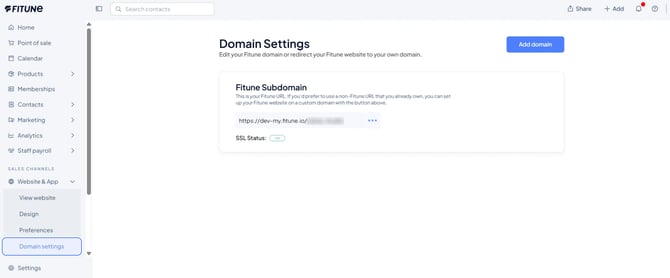
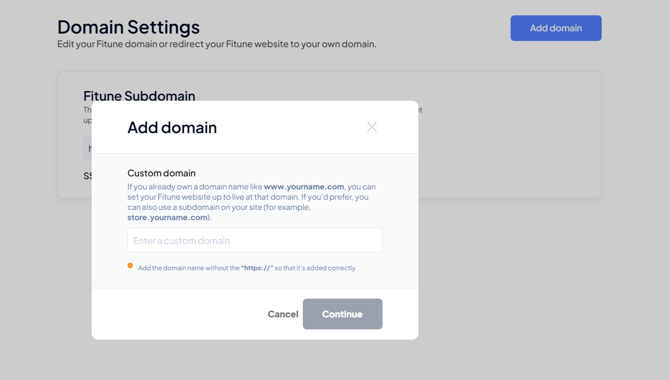
In your Fitune admin, go to Fitune Website → Domain Settings, enter the custom domain you want your website to use, and click Continue.
You can use your root domain (e.g. www.yourdomain.com) or a subdomain (e.g. classes.yourdomain.com). Don't include http:// or https://, just the address itself.
Fitune will show you a CNAME value (DNS Target). Copy it, because you'll need it in the next step.
Step 3: Configure DNS with your domain provider
This step happens outside Fitune, on the website where you manage your domain — for example GoDaddy, Hover, or Cloudflare. Log in there and add a new CNAME record with:
- Host / Name / Subdomain:
www(forwww.yourdomain.com) or your chosen subdomain (e.g.classes,academy,online) - Target / Value / Points To: paste the CNAME value Fitune gave you in Step 2
- TTL: leave the default option
Since every provider's screen looks a little different, here's where to find this setting on the most common ones:
- GoDaddy — Add CNAME record. Host/Name:
wwwor your subdomain. Points to: the CNAME value from Fitune. - Hover — Add CNAME record. Hostname:
wwwor your subdomain. Target Name: the CNAME value from Fitune. - OVH — Add CNAME record. Sub-domain:
wwwor your subdomain. Target Name: the CNAME value from Fitune. Note: OVH requires a period at the end of the CNAME value. - Cloudflare — Add CNAME record. Name:
wwwor your subdomain. Target: the CNAME value from Fitune. Note: change Proxy Status from Proxied to DNS Only.
Using a different provider? The same steps apply on 1&1, Bluehost, DreamHost, easyDNS, Google Domains, NameCheap, Network Solutions, and Squarespace, among others.
Step 4: Confirm your domain is connected
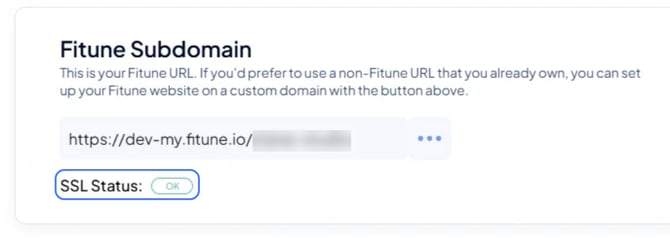
After adding the CNAME record, check back on the Domain Settings page in Fitune and wait for the SSL Status to show "OK" in green. This usually takes 24–48 hours, so don't worry if it doesn't switch over right away.
Not sure everything is set up right? Just message us in the chat with a screenshot of your DNS settings, and our team will double-check it for you.
Even with a custom domain connected, your Fitune website stays secure — we automatically provide a free SSL certificate to every Fitune customer, so there's nothing extra to set up for that.
Configuring forwarding (www vs. non-www)
If you connected your domain as www.yourdomain.com and also want yourdomain.com (without the "www") to load your site, you'll need one more thing: a forwarding/redirect rule with your domain provider, so the non-www version automatically points to the www version.
If your provider asks for an IP address to set this up, we recommend using a free service like Naked SSL, which gives you the A record you'll need for a single domain at no cost.
Frequently asked questions
▶ Does Fitune host my domain?
No. Fitune sets up a CNAME record that points your custom domain to your Fitune website — but you still need to keep an active domain registration with your domain provider to keep everything working.