
You'll find these fields under Website & App → Design, inside the Pages screen, which has four tabs: Pages, Settings, SEO and Advanced.
Settings: your site's identity
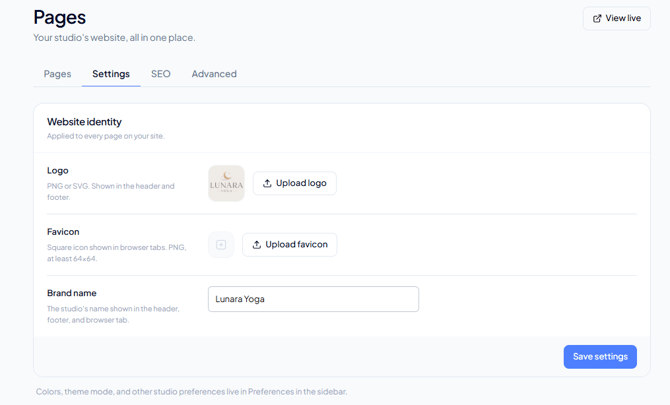
Three fields that apply to every page on your site, not just one:
- Logo — PNG or SVG. Shown in your header and footer.
- Favicon — the small square icon in the browser tab. PNG, minimum 64×64 px.
- Brand name — appears in your header, footer, and browser tab.
Default SEO: what each field is
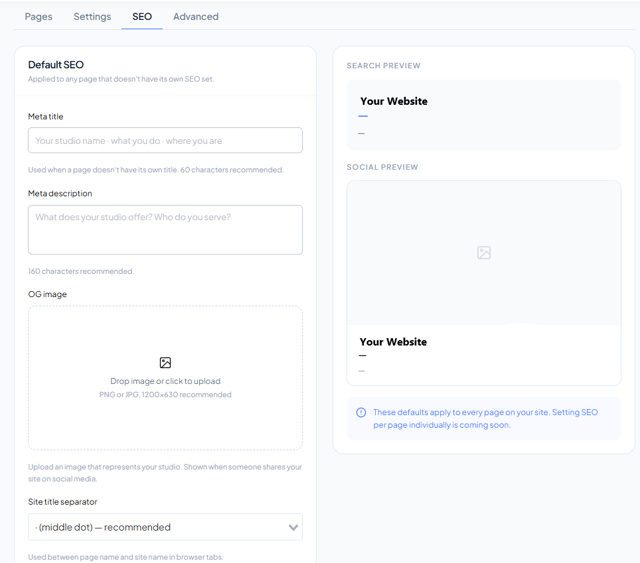
It's called "default" because these values are used on any page that doesn't have its own SEO configured. For now they apply to all your pages — per-page SEO is coming soon. On the right, two live previews — one for search, one for social — update as you type.
-
Meta title (60 characters recommended)
The blue line Google shows as your result's title, and also the text on your browser tab. If you leave it blank, the search engine invents one from whatever it finds on your page. A formula that works well: your studio's name, what you do, where you are. Example: "Lunara Yoga · Yoga and meditation in Polanco."
-
Meta description (160 characters recommended)
The grey paragraph under the title in your search result. It doesn't change your ranking, it changes how many people click. Write it as a concrete invitation: what you offer and to whom.
-
OG image (PNG or JPG, 1200×630 px)
The image that shows up when someone pastes your site's link into WhatsApp, Instagram, or Facebook. OG stands for Open Graph, the standard social platforms read. If you don't upload one, your link will share as an empty rectangle — it's the field most worth filling in if you share your link over WhatsApp.
-
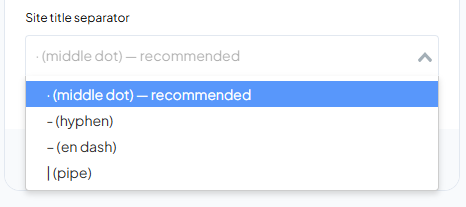
Site title separator
The character between your page name and your site name in the browser tab: "Schedule · Lunara Yoga." The middle dot is recommended. It's cosmetic and doesn't affect your ranking.
Important: this does not improve your Google ranking. These fields control how your site looks when someone finds it or shares the link, not where it ranks in search results.
Advanced: tracking and code
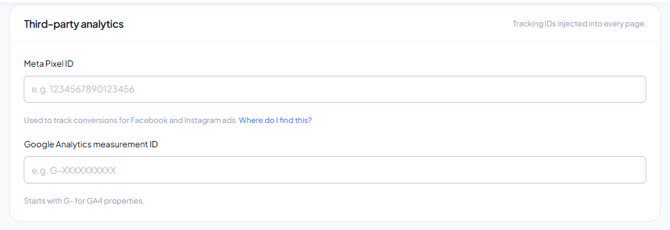
Third-party analytics
- Meta Pixel ID — tracks conversions from your Facebook and Instagram ads. The field includes a "Where do I find it?" link to help you locate it.
- Google Analytics measurement ID — starts with G- for GA4 properties. If your ID starts with UA-, that's from the older version of Analytics and won't work here.
Keep in mind: these code fields accept anything you paste, and it runs on every page of your site. If your site feels slow or behaves strangely after adding a code snippet, double-check that it was copied correctly.
Frequently Asked Questions
▶ Why does configuring my site's metadata matter? It controls how your site looks in search engines and when shared on social media, which can increase your clicks and visits.
▶ Does this improve my Google ranking? No. SEO fields control how your site looks when found or shared, not where it ranks in search results.
▶ How many characters are recommended for the meta title and description? 60 characters for the meta title and 160 for the meta description. These are recommendations, not hard limits.
▶ What size should my OG image be? 1200×630 pixels, PNG or JPG. If you don't upload one, your link will share as an empty rectangle on WhatsApp, Instagram, or Facebook.
▶ Can I set different SEO for each page? Not yet. Per-page SEO is coming soon — for now your default values apply to every page.
▶ What's the difference between the Google Analytics ID and the custom tracking code? The Analytics ID is a simple field available on every plan. The custom tracking code is code you paste by hand, available only on the Ultra plan.
▶ My Google Analytics ID starts with UA-, why doesn't it work? It's from the older version of Analytics. The field only accepts GA4 IDs, which start with G-.
▶ Do I need to know how to code to add my Google Analytics or Meta Pixel ID? No, just paste the ID into the matching field inside the Advanced tab.
▶ Do the favicon and brand name apply to every page on my site? Yes, they apply site-wide, and you'll find them in the Settings tab, not the SEO tab.