
Steps
- Log in to your account and click on Contacts from the left sidebar.
- Search for the client you want to add a plan to and click on their name.
- Inside their profile, click on Memberships and then +New.
- Select the plan you want to assign to the client.
- Optional: click the pencil icon next to the plan to edit details such as price, apply a discount code, or change the seller.
- Choose the payment method:
- Credit/Debit Card: enter the card details to process the payment through Stripe.
- Any other method (cash, transfer, etc.): payment is not processed through the platform. An invoice will be generated and reflected as income in reports.
- Free: no income will appear in reports and nothing will be charged to the client.
- If you selected card, enter the details and click Pay Now.
The plan will be automatically activated in the client's account.
Schedule a plan start date (optional)
You can define when the plan will become available:
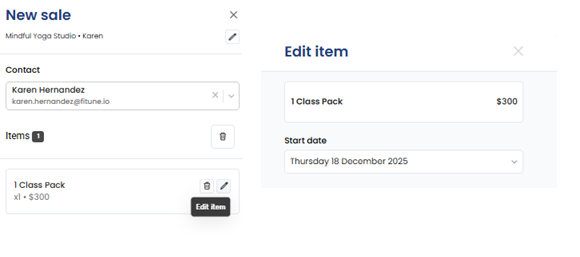
- When adding the plan in the Point of Sale, you will see a pencil icon next to it.
- Click the pencil to edit the plan details.
- Select the start date when the plan will be available.
- Save your changes.
This works for both unlimited memberships and credit-based packages.
Important: if you activate a recurring membership with a payment method other than a card, a monthly invoice will be generated with the status Unpaid. You will need to enter the client's profile each month to register the payment manually and keep their access active.
Frequently asked questions
▶ Can I edit the start date of the membership after saving? No, that option is currently not available.
▶ What if my client pays for the membership in advance? This is not currently recommended as there is no 100% effective way to handle it. Contact the support team for guidance, as the resolution may vary depending on the membership type and payment circumstances.