
You can change the template of any marketing page, including Home, without deleting and recreating the page.
Where to find it
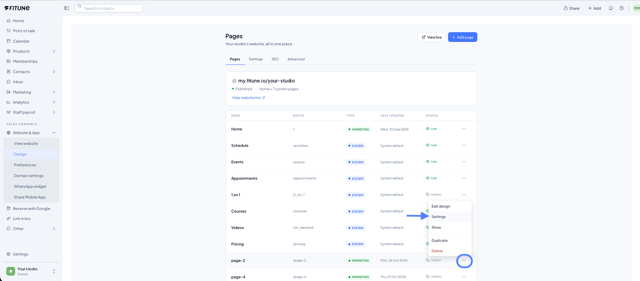
Website & App → Design → ⋯ on the page's row → Settings → Template → Change template.
Step by step
- In Pages, click ⋯ on the page's row and choose Settings.
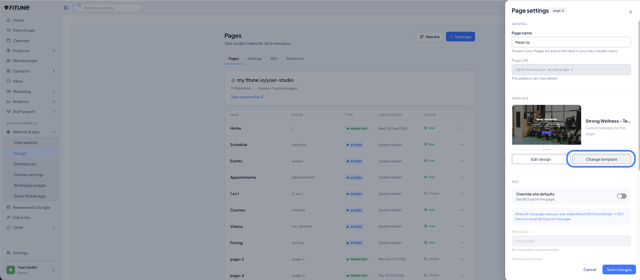
- In the Template section, click Change template. A window opens with the gallery of 30 templates, without leaving Pages. At the top you will see the current template.
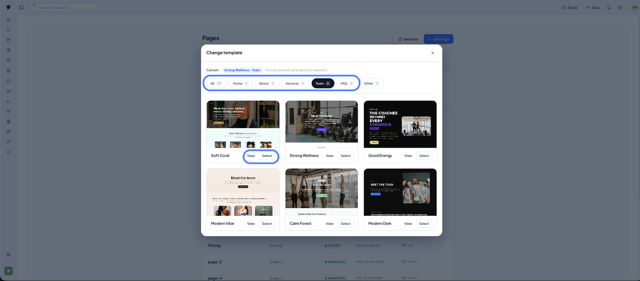
- Filter by category and use View to preview any template.
- Pick one with Select.
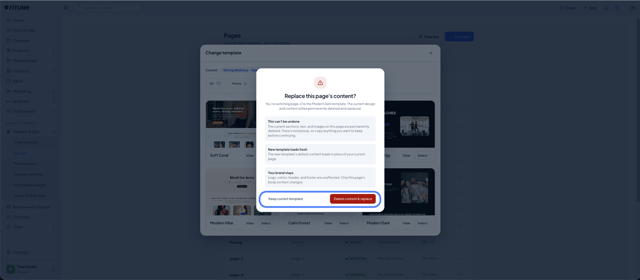
- Read the Replace this page's content? message and choose Keep current template or Delete content & replace.
Once confirmed, the editor opens with the new template loaded, ready to customize by hand or with the AI assistant.
Important before you confirm
The confirmation message explains three things:
- This can't be undone. The current sections, text, and images on the page are permanently deleted. There is no backup, so copy anything you want to keep before continuing.
- The new template loads fresh. The new template's default content replaces your current page content.
- Your brand stays. Logo, colors, header, and footer are unaffected. Only that page's body content changes.
What stays the same
The page's name, URL, SEO settings, and status do not change.
System pages do not have templates, so they do not show this option.
Frequently Asked Questions
▶ Can I undo a template change? No. The current content is permanently deleted, with no backup and no undo.
▶ Can I change the template of my Home page? Yes. It works on any marketing page, including Home.
▶ Does the page's URL or SEO change? No. The name, URL, SEO settings, and status stay the same.
▶ Will I lose my logo or colors when I change the template? No. Logo, colors, header, and footer are unaffected. Only the page's body content changes.
▶ Why don't I see the template option on a page? System pages do not have templates, so they do not show this option.