
This counts toward the Convert pillar of your Fitune Health Score. Not everyone who walks past your studio or stops at your front desk is online at that exact moment — a QR code (a scannable square barcode a phone's camera can read) turns a curious passerby or a visitor at your counter into someone who's just one scan away from signing up, buying, or seeing your schedule. This item checks for two physical materials: a stand at your front desk, and a sticker on your window.
Front-desk stand: get new visitors set up on the spot
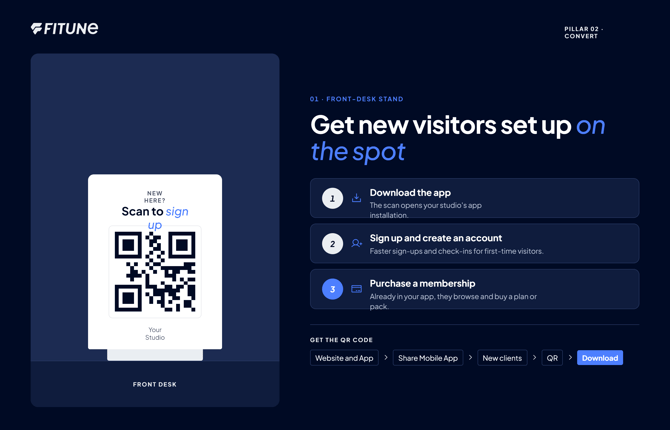
This is a small stand or sign at your reception counter, meant for people visiting or asking about your studio in person. It uses one QR code from Fitune's own Share Mobile App screen, found under Website and App in the left-hand menu, on the New clients tab — Fitune labels this option "Easy sign-up for first-time clients," and recommends printing it exactly as a QR code for your front desk.
1. Download the app. The same QR code opens the client's browser straight to your studio's app installation — nothing extra to set up here beyond what's covered below.
2. Sign up and create an account. Once open, the link walks the visitor straight into creating their account, which is exactly why Fitune's own description for this QR calls it out for "streamlin[ing] sign-ups for first-time visitors" and "sav[ing] time during check-ins."
3. Purchase a membership. After creating their account, the client is already inside your studio's app or site, where they can browse and buy a plan or pack themselves — no separate link or QR needed for this step.
To get this QR code, go to Website and App → Share Mobile App, stay on the New clients tab, and select QR under "Send to phone." This opens a QR code screen with the code already generated and labeled with your studio's name — select Download to save the image, ready to print.
Window sticker: bring in people walking by
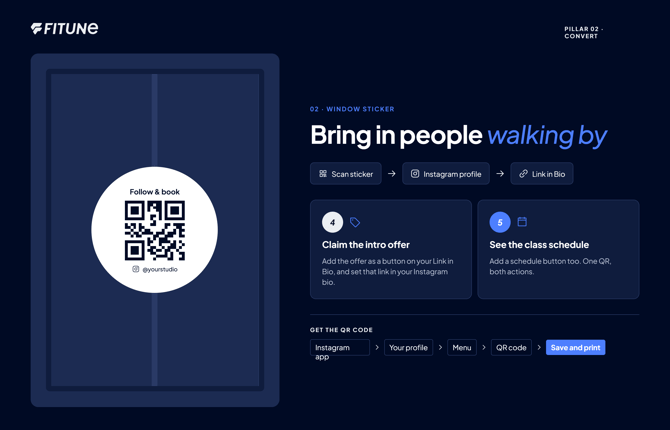
This is a sticker for your studio’s window or door, made for people passing by who haven’t come in yet. Fitune doesn’t create a QR code for your Link in Bio page. Instead, use your studio’s Instagram QR code. It’s built into Instagram, and anyone who scans it goes straight to your Instagram profile.
4. Claim the intro offer. Add your intro offer as a button on your Link in Bio page, and make sure that page is the link in your Instagram bio (same setup as for your Instagram bio link). When someone scans your QR code and lands on your profile, your bio link is right there to tap.
5.See the class schedule. Add a button to your schedule on your Link in Bio page too. That way, one Instagram QR code does both jobs: people scan the sticker, open your profile, tap your bio link, and find your classes or your offer, whichever they came for.
How to get your Instagram QR code
- Open the Instagram app and go to your profile.
- Follow Instagram’s guide on finding and customizing your Instagram QR code. It shows you how to open the menu and choose the QR code option.
- Save the image so you can print it for your window.
Frequently asked questions
▶ Do I need two separate QR codes, one for the stand and one for the sticker?
Yes — the front-desk stand uses the "create account" QR from Share Mobile App, while the window sticker uses your studio's own Instagram QR code.
▶ Can I use the same QR code for both?
You could, but it's worth keeping them separate: the front-desk one is built to streamline sign-ups on the spot, while the window sticker is meant to capture interest from people who haven't walked in yet and may want to see your schedule or offer first.
▶ Why doesn't Fitune generate the window sticker QR code the same way?
The Share Mobile App screen only generates QR codes for its own app links; your Link in Bio page isn't tied to that same QR generator, so your studio's Instagram QR code fills that gap instead.
▶ What if my Instagram bio link isn't set to my Link in Bio page yet?
Update it first — otherwise, someone scanning your window sticker will land on your Instagram profile but won't find your offer or schedule waiting for them.