
How does this report help you?
- See total bookings, no-shows, and cancellations (early and late) within a date range.
- Know your no-show and cancellation rates.
- See how much has been charged in no-show or late cancellation fees.
- Identify how many distinct (unique) clients have cancelled or missed a session.
- See the trend of attendances, cancellations, and no-shows over time.
- Analyze which payment method or membership is associated with more no-shows or cancellations.
Available Visualizations
-
Overview
Shows totals for bookings, no-shows, late cancellations, early cancellations, and total cancellations; the amount charged in fees; no-show and cancellation rates; and the number of unique clients who have cancelled or missed a session.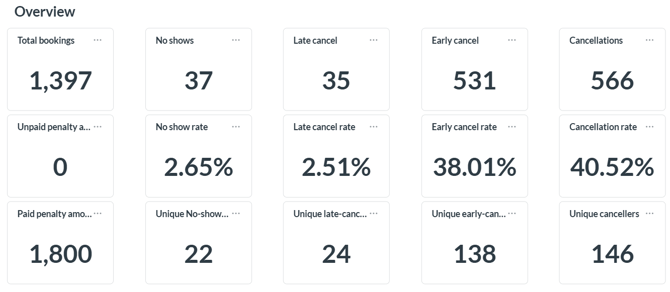
-
Trend Over Time
Stacked bar chart showing, by week, the breakdown between attendances, early cancellations, late cancellations, and no-shows.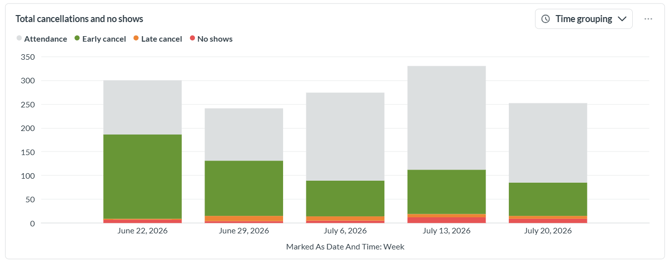
- No-Shows by Payment Option
Donut chart showing what percentage of no-shows corresponds to each membership, pack, or payment method.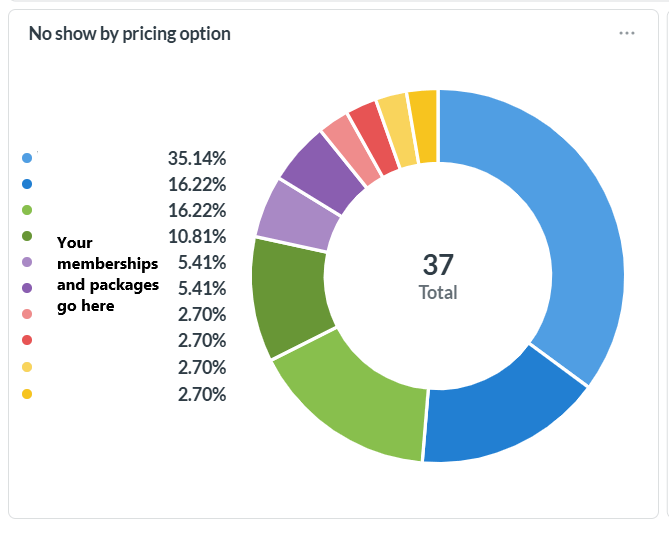
-
Cancellations by Payment Option
Donut chart showing what percentage of cancellations corresponds to each membership, pack, or payment method.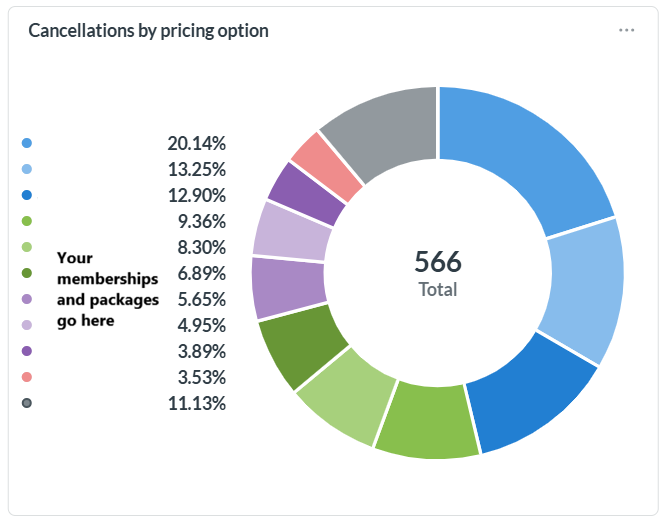
Information Available in the Report
- Total bookings – total number of bookings within the selected range.
- No-shows – number of bookings marked as a no-show.
- Late cancellation – number of cancellations made outside the free cancellation window.
- Early cancellation – number of cancellations made within the allowed window, with no penalty.
- Cancellations – total cancellations (late + early).
- No-show fee amount – total charged for no-show penalties.
- Late cancellation fee amount – total charged for late cancellation penalties.
- No-show rate – percentage of bookings that resulted in a no-show.
- Late cancellation rate – percentage of bookings cancelled late.
- Early cancellation rate – percentage of bookings cancelled on time.
- Cancellation rate – total percentage of bookings that were cancelled.
- Unique no-shows – number of distinct clients who had at least one no-show.
- Unique late cancellations – number of distinct clients who cancelled late at least once.
- Unique early cancellers – number of distinct clients who cancelled early at least once.
- Unique cancellers – total number of distinct clients who have cancelled.
Frequently Asked Questions
▶ What's the difference between an early and a late cancellation? An early cancellation happens within the allowed window with no penalty; a late cancellation happens outside that window and may generate a fee, depending on your studio's cancellation policy.
▶ Where does the fee amount come from? From the total charged to your clients for no-show or late cancellation penalties, based on your cancellation policy settings.
▶ Why are there both "no-shows" and "unique no-shows"? "No-shows" counts every no-show instance, while "unique no-shows" counts how many distinct clients had at least one no-show, regardless of how many times.
▶ What does the "payment option" chart show? It helps you identify whether certain membership types, packs, or payment methods are more associated with no-shows or cancellations, so you can adjust your policies if needed.