
How does this report help you?
- Identify which memberships are about to expire before it's too late.
- Prioritize outreach for clients who need immediate attention.
- Spot clients with no upcoming visit scheduled.
- Plan renewal and re-engagement campaigns.
- Understand whether an expiration is just a transition or a real client loss.
Available Visualizations
-
Overview
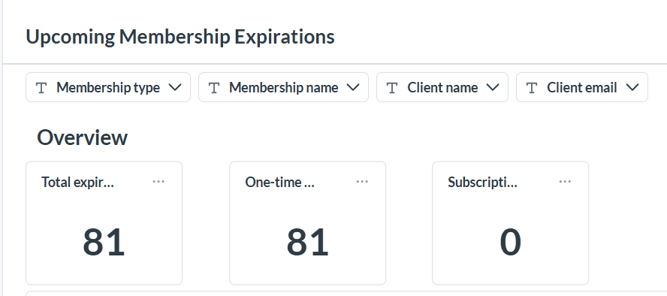
Shows the total memberships expiring, how many are one-time payments, and how many are subscriptions that reached their final renewal, within the selected period.
-
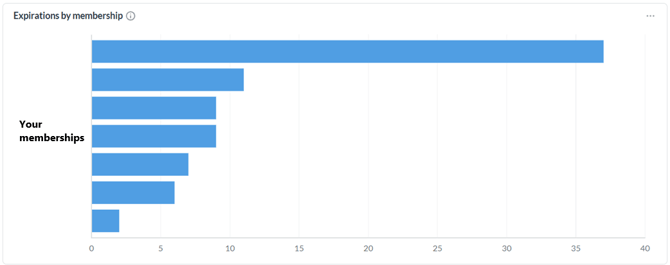
Expirations by Membership
Shows which memberships have the most expirations concentrated, so you can quickly identify where to focus your outreach.
-
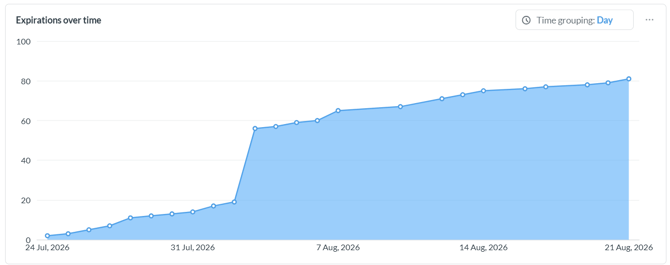
Expirations Over Time
Helps you see whether expirations hit all at once or trickle in gradually throughout the selected period.
-
Expirations by Days Left
Groups memberships by urgency (0–7, 8–15, 16–30, and 31+ days), so you know how many clients need attention this week.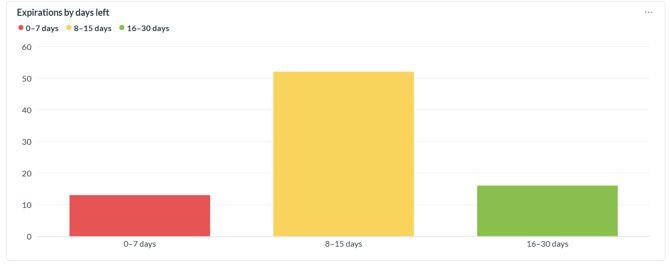
Information Available in the Report
- Expiration date – the date the membership expires.
- Days left – days remaining until expiration, with a color-coded urgency badge.
- Contact – client's name.
- Email – client's email address.
- Mobile – client's phone number.
- Membership – name of the expiring membership.
- Type – one-time payment or subscription.
- Renewal number – current cycle out of the total defined (e.g. "3 of 3").
- Next booking – the client's next scheduled booking, if any.
- Other active memberships – other memberships the client currently holds.
- Scheduled memberships – memberships already purchased that will start in the future.
Frequently Asked Questions
▶ Which memberships appear in this report? Only those with a known expiration date: one-time payments and subscriptions with a defined number of renewals.
▶ Why don't I see my unlimited subscriptions? Infinite-cycle subscriptions have no natural expiration date, since they renew until manually cancelled, so they don't appear in this report.
▶ What does "renewal number" mean? It shows which renewal cycle the client is on out of the total defined (for example, "3 of 3" means they're on their final renewal).
▶ How do I know which client to prioritize? Clients with no upcoming booking and no other active or scheduled memberships are the highest priority, since they have no reason to visit the studio before their membership expires.
▶ What does it mean if a client has a scheduled membership? It means the client has already purchased another membership that will start after the current one expires, so the urgency to reach out is lower.