
Fitune now syncs booking windows with TotalPass. This means TotalPass clients can only book classes when the booking window configured in Fitune is open.
As a result, clients receive clearer information about when they can and cannot book, reducing automatic cancellations and support requests.
What Changed?
-
Before: a TotalPass client could attempt to book outside the allowed booking window. The booking request would be sent to Fitune and later cancelled automatically. This often caused confusion because the client believed the studio had cancelled their booking.
-
Now: booking windows configured in Fitune are automatically shared with TotalPass. If a client attempts to book outside the allowed window, TotalPass will prevent the booking and display the reason why it is unavailable.
How Do Booking Windows Work?
Booking Windows determine when clients can book a class.
- Booking Opening Window: defines when clients can begin booking a class. Example: if the booking opening window is configured for 2 days before the class starts, a class scheduled for Monday at 10:00 AM will be available for booking starting Saturday at 10:00 AM.
- Booking Closing Window: defines how close to the class start time clients can continue booking. Example: if the booking closing window is configured for 12 hours before the class starts, a class scheduled for Monday at 10:00 AM will stop accepting bookings on Sunday at 10:00 PM.
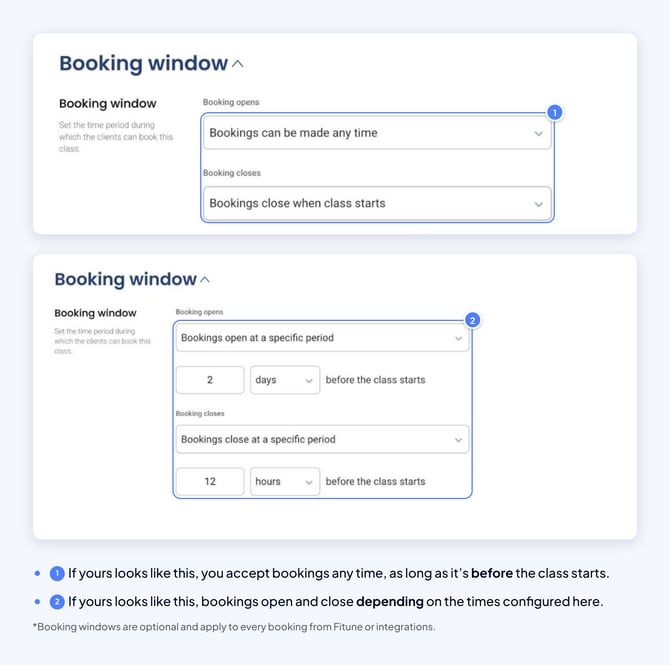
Verify the Booking Window Settings
- Go to your schedule in Fitune.
- Select the corresponding class.
- Click Actions.
- Select Edit Schedule.
- Review the Booking Window settings.
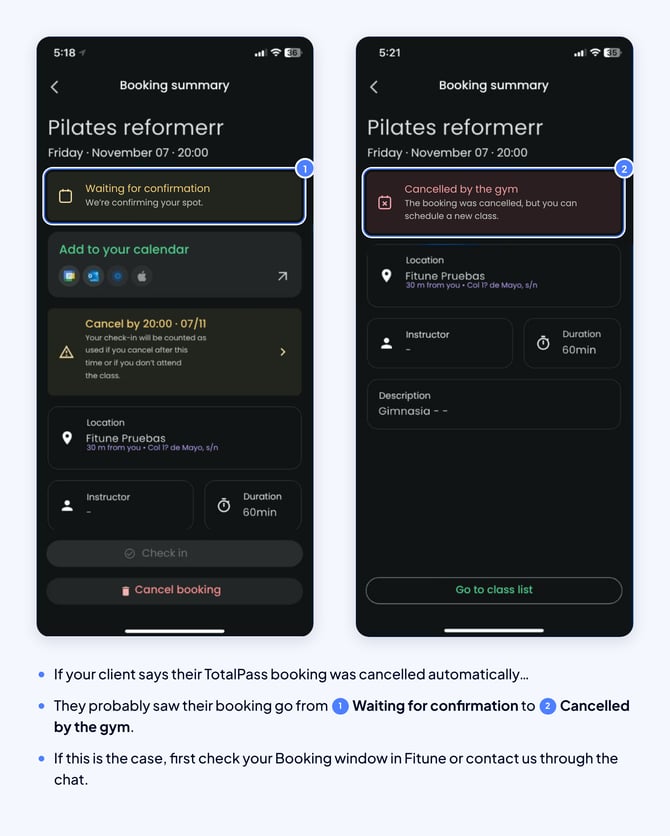
Verify Whether the Booking Was Cancelled Manually
Review the booking history from:
- Client Profile > Bookings > History
- Schedule Overview > Cancelled > Booking Details
Frequently Asked Questions
▶ Do Fitune booking windows affect TotalPass bookings? Yes. Booking windows configured in Fitune are automatically synced with TotalPass.
▶ Can clients book before the booking window opens? No. TotalPass respects the booking opening window configured in Fitune.
▶ Can clients book after the booking window closes? No. TotalPass respects the booking closing window configured in Fitune.
▶ Why were bookings cancelled before? Previously, TotalPass did not receive booking window restrictions. A booking could be created and later cancelled by Fitune if it did not meet the configured booking window requirements.
▶ Will Fitune continue automatically cancelling these bookings? In most cases, no. Because TotalPass now receives the booking window configuration, clients cannot complete bookings outside the allowed booking period.
▶ What should I do if a booking was cancelled and does not appear to be related to the booking window? Review the booking history and booking window settings. If neither of these explains the cancellation, contact Fitune Support for further investigation.
Tip: keep your booking windows updated to provide a consistent experience across both Fitune and TotalPass while reducing client confusion.