
How can this report help you?
- Identify your most active clients.
- Measure client engagement.
- Analyze attendance trends over time.
- Identify your busiest and slowest days.
- Evaluate which memberships, packs, or integrations generate the most attendances.
- Make data-driven decisions to improve retention and occupancy.
Key Metrics
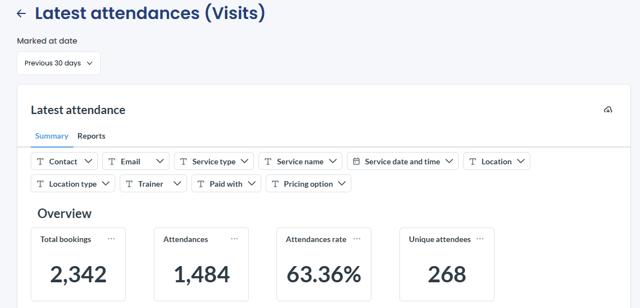
- Total Bookings – total number of bookings made during the selected period.
- Attendances – total number of bookings marked as attended.
- Unique Attendees – number of unique clients with at least one attendance during the selected period.
- Attendance Rate – percentage of bookings that resulted in a recorded attendance.
Formula: Total Attendances ÷ Total Bookings × 100
Available Visualizations
-
Overview
Displays a summary of the key attendance metrics for the selected period.
-
Bookings and Attendance Trend
Compares booking and attendance activity over time.


-
Top 10 Clients by Attendance
Highlights the clients with the highest number of attendances.

-
Attendances by Weekday
Helps identify the busiest and slowest days of the week.

-
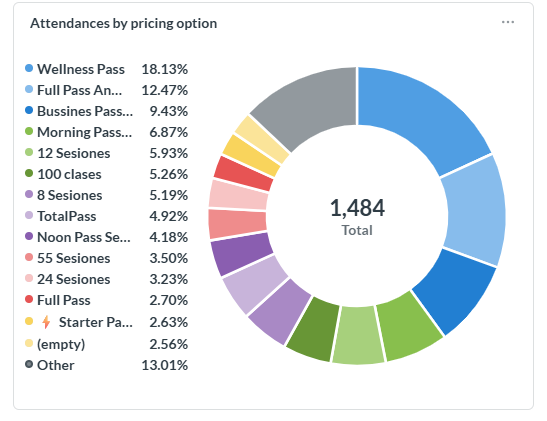
Attendances by Pricing Option
Shows which memberships, packs, or integrations generate the most attendance.
Information Available in the Report
Attendances by Booking
- Client – client associated with the booking.
- Email Address – client's email address.
- Attendance Date – date when attendance was recorded.
- Service – attended class or appointment.
- Trainer – assigned trainer.
- Location – service location.
- Pricing Option – membership, pack, or integration used.
Attendances by Client
- Client – client name.
- Email Address – client's email address.
- Attendances – total number of attendances recorded.
- Total Bookings – total number of bookings made.
- Attendance Rate – client attendance percentage.
Attendances by Pricing Option
- Pricing Option – membership, pack, or integration used.
- Attendances – total attendances recorded.
- Total Bookings – total bookings recorded.
- Attendance Rate – attendance percentage associated with that pricing option.
Frequently Asked Questions
▶ What is the difference between Attendances and Unique Attendees? Attendances represents the total number of bookings marked as attended. Unique Attendees represents the number of different clients who attended at least once during the selected period. For example, if a client attended 10 classes, it counts as 10 attendances but only 1 unique attendee.
▶ How is the Attendance Rate calculated? The Attendance Rate represents the percentage of bookings that resulted in a recorded attendance. Formula: Total Attendances ÷ Total Bookings × 100.
▶ Which pricing options appear in this report? Depending on your setup, pricing options may include memberships, packs, TotalPass, Wellhub, and other payment methods used for bookings.
▶ What date range does this report analyze? By default, the report displays data from the last 30 days, but you can adjust the date range as needed.