
This is part of the Attract pillar of your Fitune Health Score — Wellhub brings you a whole new pool of potential clients who are already paying for a wellness membership and looking for places like yours to use it.
Requires a paid Fitune plan. Only group classes and in-person events can be shared through Wellhub — appointments aren't supported.
Step 1: Ask Wellhub to connect with Fitune
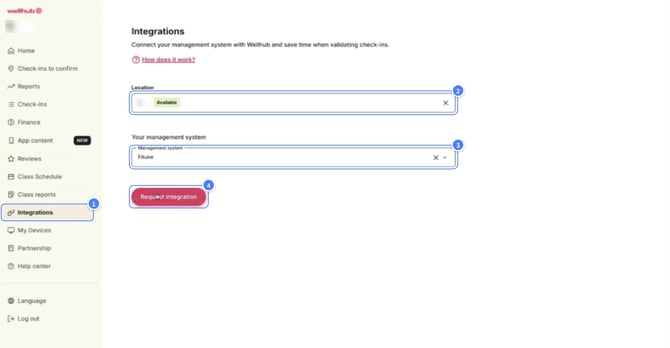
Before anything happens on the Fitune side, you need to request the integration from Wellhub directly:
- Log into the Wellhub Partner Portal.
- Go to the Integrations section.
- Submit a request to integrate with Fitune.
- Wait for Wellhub's approval email — this part is on their timeline, not Fitune's.
If you're already using a different booking software with Wellhub, keep in mind Wellhub only allows one software integration active at a time — you'll need to disconnect the other one from your Wellhub admin portal first before you can connect Fitune.
Step 2: Connect Fitune using your GymID
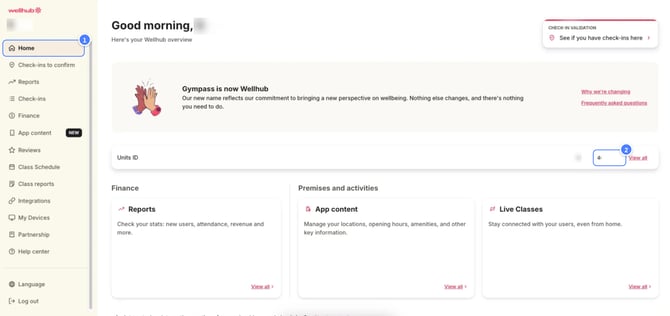
Once Wellhub approves you, you'll get a GymID — a 6-digit code from the Wellhub Partner Portal that Fitune uses to link your account.
- In Fitune, go to Settings → Integrations → Wellhub.
- Click Connect account.
- Enter your GymID and save.
- Go to the Sync classes tab and select which classes you want to share with Wellhub.
Step 3: Turn Wellhub on for each class
Connecting your account doesn't automatically open every class to Wellhub members — you choose this per class:
- Go to your Calendar.
- Edit the class or schedule you want to share.
- Turn on Display at Wellhub.
- Set the maximum Wellhub spots for that class — a number between 0 and 10, based on how much of your capacity you want available to Wellhub members versus your own clients.
- Save, choosing whether this applies to just this one occurrence or to future ones too.
For example, if a class holds 10 people and you set 5 Wellhub spots, 5 spots are reserved for Wellhub bookings and the other 5 stay available for your regular clients and members.
What to expect once it's running
- Clients check in through the Wellhub app, not through Fitune — check-in opens 30 minutes before class starts.
- Your existing booking windows still apply — Wellhub bookings follow the same rules as any other booking in Fitune.
- Walk-ins are allowed by default — a client can check in via the Wellhub app without booking ahead, but since no booking was ever made, there's no record of it in Fitune at all, and your booking window doesn't apply (there was nothing for it to apply to). If you'd rather clients only check in when they've booked ahead of time, you can ask Wellhub to disable walk-in check-ins for your studio — just keep in mind that as long as they're enabled, those visits simply won't show up anywhere in your Fitune records.
- Wellhub bookings are tagged — you'll see a Wellhub label next to these clients in your attendance list, on the schedule details page, and as a "Wellhub" source in your reports, so you always know where a booking came from.
- You can cancel a Wellhub booking from Fitune if needed, but check-in and rescheduling have to be done by the client, directly in the Wellhub app — that part isn't something you can do from the Fitune admin.
- Editing a class name or description after it's synced updates automatically in Wellhub too — no need to recreate the class from scratch.
FAQ
▶ Why can't I mark attendance for a Wellhub client myself?
Wellhub clients have to check in from the Wellhub app — it can't be marked manually from the Fitune admin.
▶ Why don't I see Wellhub options when creating a class?
Your classes need to be synced first — go to Settings → Integrations → Wellhub, click Sync classes, and select the ones you want.
▶ What happens if my Wellhub plan changes?
Refresh the connection: go to Settings → Integrations → Wellhub, disconnect, wait about 5 minutes, then reconnect using the same GymID.
▶ Can I offer 1-on-1 appointments through Wellhub?
No — only group classes and events can be shared; appointments aren't supported.
▶ A client says they used Wellhub but I don't see their booking — what happened?
They likely did a walk-in check-in (showed up and checked in via the Wellhub app without booking ahead). Fitune creates their client contact, but there's no booking record since they never made a reservation.
Once Wellhub is running well, it's worth checking out How do people book me from the Wellhub/Gympass app? to see exactly what the booking experience looks like from a member's side.