
This counts toward the Convert pillar of your Fitune Health Score. Not every visitor who finds your studio online is ready to book a class right away — some just want to try you out first. Capturing that interest, instead of losing it, is what this item is about: giving people an easy, low-commitment way to say "yes, I'm interested," so you can turn them into paying clients afterward.
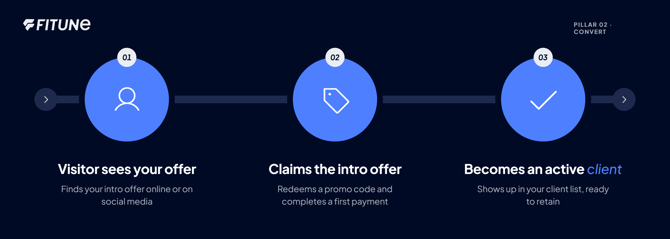
What counts as a "lead" for your studio
A lead is simply someone who has shown real interest but hasn't paid for anything yet — they clicked your link, started signing up, or asked a question, but stopped short of a booking or purchase. The goal isn't to get more clicks; it's to give that person a reason to take the next step, and to make that next step effortless.
Turn your intro offer into your lead-capture tool
The most reliable way to capture leads with Fitune is your intro offer, delivered through a promo code. Instead of asking a stranger to commit to a full-price membership, you're asking them to try you out for less — a much easier "yes."
You can set this up under Marketing → Promo Codes → + New Promo Code.
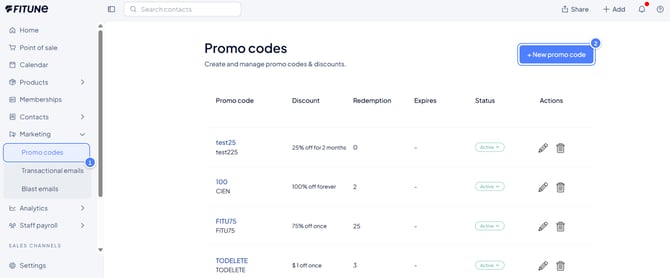
A few settings matter specifically for lead capture:
Set Restrict to new clients only, so the discount is reserved for people who have never bought from you before — this is what makes it a true "first visit" offer instead of a general discount.
Choose a Discount Amount generous enough to remove hesitation (a percentage off or a fixed amount both work). Under Applies To, point the code at your intro class, pack, or short-term pass, rather than your full membership — you want the first "yes" to be small. And set an Expiration Date, so the offer feels timely ("claim this by Sunday") rather than something to think about later and forget.
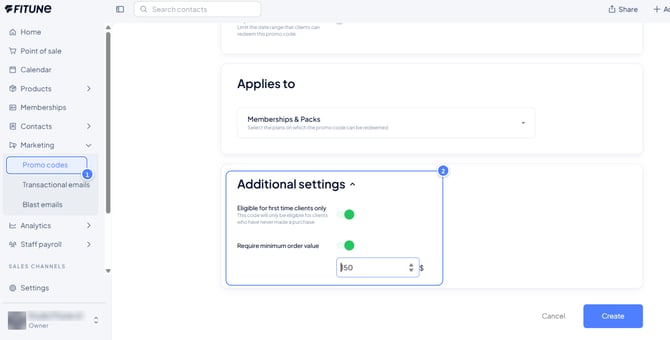
For the exact meaning of every field in this screen, see How to Create Promo Codes, which covers the full set of options in detail.
Make the offer effortless to find
An intro offer only captures leads if people actually see it. Put the code (or a direct link to redeem it) somewhere a new visitor naturally looks first — your Instagram bio, as covered in Create Your Link in Bio, and the top of your studio's website. The fewer taps between "I'm curious" and "I claimed the offer," the more leads you'll capture.
When does a lead actually become an active client?
This is the moment that matters most to track: a lead becomes an active client the instant they complete a paid action — redeeming your intro offer and finishing checkout, buying a pack, or purchasing a membership.
Even a heavily discounted first payment counts, because it's the moment they've moved from "interested" to "paying."
From that point on, they appear in your client list and reports like any other active client, and the real retention work (keeping them coming back) begins.
If someone starts the process — clicks the link, even starts entering their details — but never finishes the payment, they're still just a lead.
It's worth checking in personally with people who show that kind of interest but don't follow through; a quick, friendly message asking if they had any questions often converts a stalled lead into a booked class.
Frequently asked questions
▶ Do I need a special "leads" screen in Fitune to do this?
No — Fitune doesn't have a separate leads inbox today. Lead capture works through your intro offer (a promo code) and making it easy to find; once someone redeems it and pays, they show up as an active client automatically.
▶ What's the difference between an intro offer and a regular discount?
An intro offer is restricted to new clients only and applies to a small, low-commitment item (a single class or short pass). A regular promo code can apply to anyone and to any product, so it doesn't specifically target new-lead conversion.
▶ Should my intro offer be free or discounted?
Either can work — what matters most is that the commitment is small. A steep discount on a single class is usually enough to remove hesitation without giving away a full membership.
▶ Where do people redeem the promo code?
During checkout, whenever they book or purchase — they simply enter the code, and the discount is applied automatically as long as the code is still valid and unused by them.