
What is a payroll cycle?
Your payroll cycle is how often you pay your staff. It sets the start and end date of every pay period. For each period, Fitune creates a payroll report.
There's one payroll cycle per studio, and it applies to all your staff. Fitune doesn't pick one for you. Nothing starts until you choose a cycle and save it.
The three cycle options
- Weekly – runs Monday to Sunday.
Example: Mon, Apr 14 – Sun, Apr 20, then Mon, Apr 21 – Sun, Apr 27. - Twice a month – runs from the 1st to the 15th, and from the 16th to the last day of the month.
Example: Apr 1 – Apr 15, then Apr 16 – Apr 30. - Monthly – runs from the 1st to the last day of the month.
Example: Apr 1 – Apr 30, then May 1 – May 31.
"Last day of the month" adjusts automatically: 28, 29, 30, or 31, depending on the month.*
How to set your payroll cycle
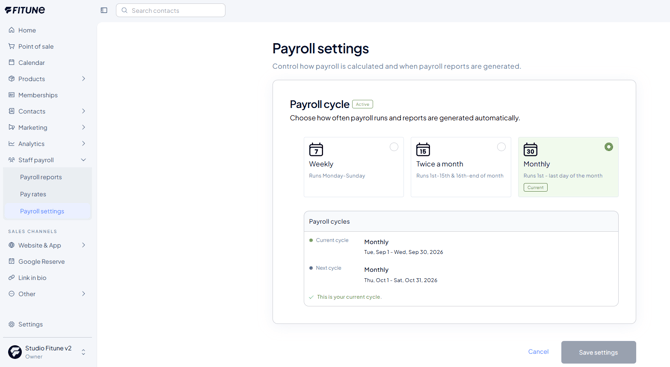
- In the left menu, go to Staff payroll > Payroll settings.
- Under Payroll cycle, choose Weekly, Twice a month, or Monthly.
- Check the Payroll cycles box below. It shows the dates of your current cycle and your next one, so you can see exactly what you're choosing before you save.
- Click Save settings.
That's it. Your cycle now shows the Active label, and the option you chose is marked Current.
What if I start in the middle of a period?
If you save your cycle on a day that isn't its natural start, your first pay period is shorter. It runs from the day you saved it until the end of that period. We call this a prorated period. From the second period on, every period is full length.
Natural start days:
- Weekly – Monday
- Twice a month – the 1st or the 16th
- Monthly – the 1st
Examples:
- You choose Weekly on Friday, Apr 18. Your first period is Fri, Apr 18 – Sun, Apr 20 (3 days). The next one is Mon, Apr 21 – Sun, Apr 27.
- You choose Twice a month on Apr 10. Your first period is Apr 10 – Apr 15. The next one is Apr 16 – Apr 30.
- You choose Monthly on Apr 20. Your first period is Apr 20 – Apr 30. The next one is May 1 – May 31.
If you save on the natural start day (a Monday for Weekly, the 1st or 16th for Twice a month, the 1st for Monthly), your first period is already full length.
What does this mean for pay?
During a prorated period, staff are paid only for the days the cycle was active. For example, a fixed weekly pay for a 3-day first period (Friday to Sunday) is 3/7 of the weekly amount.
Changing your payroll cycle
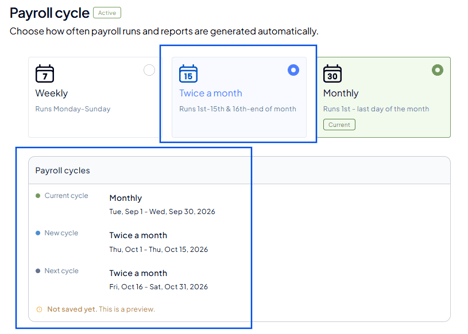
You can change your cycle at any time. The change doesn't happen right away:
- Your current period finishes as planned, so nothing already in progress changes.
- The new cycle starts the day after the current period ends.
- If that day isn't the natural start of the new cycle, the first period of the new cycle is prorated (shorter), just like on first setup.
Example:
you're on Monthly and switch to Weekly in the middle of April. April finishes as usual (Apr 1 – Apr 30).
The Weekly cycle starts on May 1. Since May 1 isn't a Monday, your first weekly period runs from May 1 until the following Sunday. After that, every period runs Monday to Sunday.
Before you save, check the Next cycle line in the Payroll cycles box. It shows exactly when the new cycle begins.
Frequently Asked Questions
▶ Why is my first pay period shorter than the others?
You saved your cycle on a day that isn't its natural start (a Monday for Weekly, the 1st or 16th for Twice a month, the 1st for Monthly). The first period runs from that day to the end of the period. All periods after it are full length.
▶ If I change my cycle today, does it change right away?
No. Your current period finishes first. The new cycle starts the next day.
▶ Will changing my cycle affect reports I already have?
No. Periods that already ended keep their dates and their reports.
▶ Can I have a different cycle for each staff member?
No. There's one payroll cycle per studio, and it applies to all your staff.
▶ I don't see any payroll reports. Why?
Check that you've chosen and saved a payroll cycle. Fitune doesn't set one automatically.