
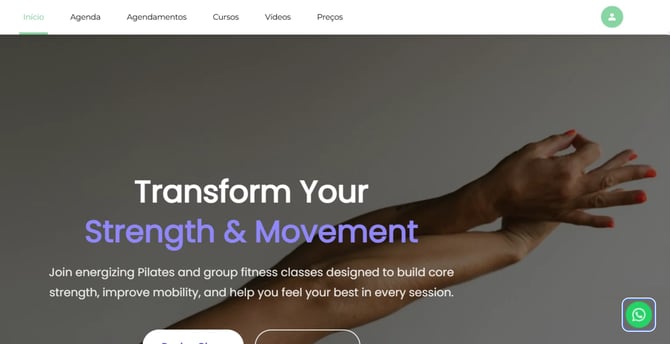
This counts toward the Convert pillar of your Fitune Health Score. Some visitors land on your website with a question and aren't ready to book — a class time that isn't clear, a price they want to confirm, or just a "is this right for me?" hesitation. The WhatsApp widget puts a chat button on your site so those visitors can message you directly, instead of leaving without ever reaching out.
Turning the widget on
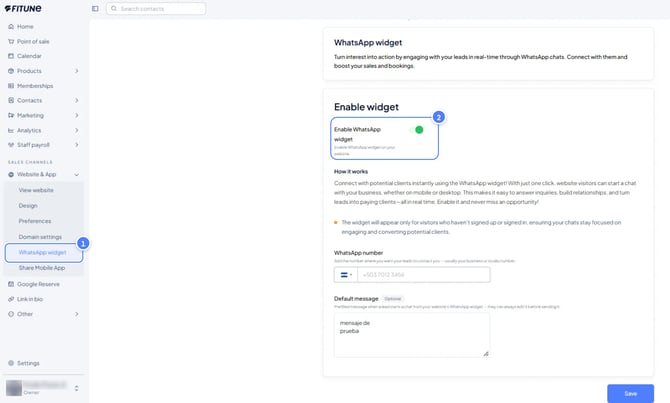
In the left-hand menu of your Fitune admin, open Website & App, then select WhatsApp widget. Switch on Enable WhatsApp widget — the toggle (a switch you activate to turn a feature on or off) that makes the chat button appear on your site.
Adding your number and a starting message
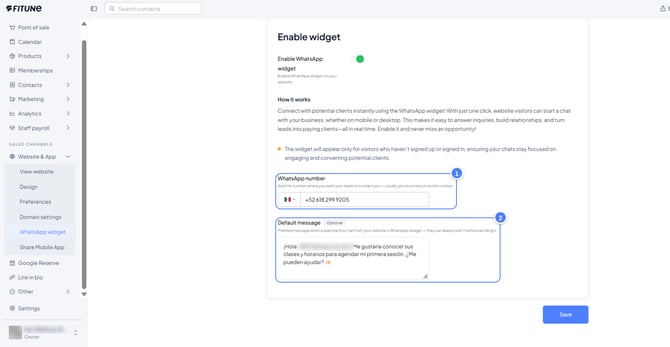
With the widget enabled, enter your WhatsApp number. Use a number your studio checks often, because every conversation started from your website lands there.
Below it, you can add a Default message. This is a short message that appears in the chat as soon as a visitor clicks the widget. Visitors can still edit it before they send it.
A simple, friendly line works best, like “Hi! I’d like to know more about your classes.” It helps hesitant visitors, because they don’t have to think about what to write first.
When everything looks right, select Save.
Worth knowing: the widget only appears to visitors who haven't signed up or signed in yet — so it's specifically there to catch new, still-undecided visitors, the same people this article on setting up online lead capture is about turning into active clients, rather than adding chat clutter for clients who already have an account.
Frequently asked questions
▶ Will existing clients see the WhatsApp widget when they visit my site?
No — it's designed to appear only for visitors who haven't signed up or signed in, so it stays focused on new, undecided visitors rather than people who already have an account with you.
▶ Is the default message required?
No, it's optional. If you leave it blank, the visitor simply starts the conversation with a blank message of their own.
▶ Which number should I use?
Whichever number your studio actually monitors day to day — since every chat started through the widget arrives there, as a normal WhatsApp conversation.
▶ Can a visitor edit the default message before sending it?
Yes — it's pre-filled to make starting the conversation easier, but the visitor can change it to whatever they'd actually like to ask before hitting send.