
This counts toward the Operate pillar of your Fitune Health Score. Fitune already tracks almost everything happening in your studio — bookings, revenue, attendance, membership renewals — but that data only helps you if you actually look at it. This article isn't about finding every report Fitune offers (there's a dedicated guide for that); it's about picking a handful worth checking regularly, so small problems show up before they become big ones.
Where all your reports live
Every report in Fitune is organized under Analytics in the left-hand menu, grouped by category: financial reports, bookings, classes, appointments, memberships, contacts, and videos. If you want the full list of what's available, the Fitune Reports: Control and Management of Your Business article covers all 17 in detail. What follows here is a shorter list — the reports most worth building a habit around, and how often to check each one.
A few reports worth checking on a rhythm
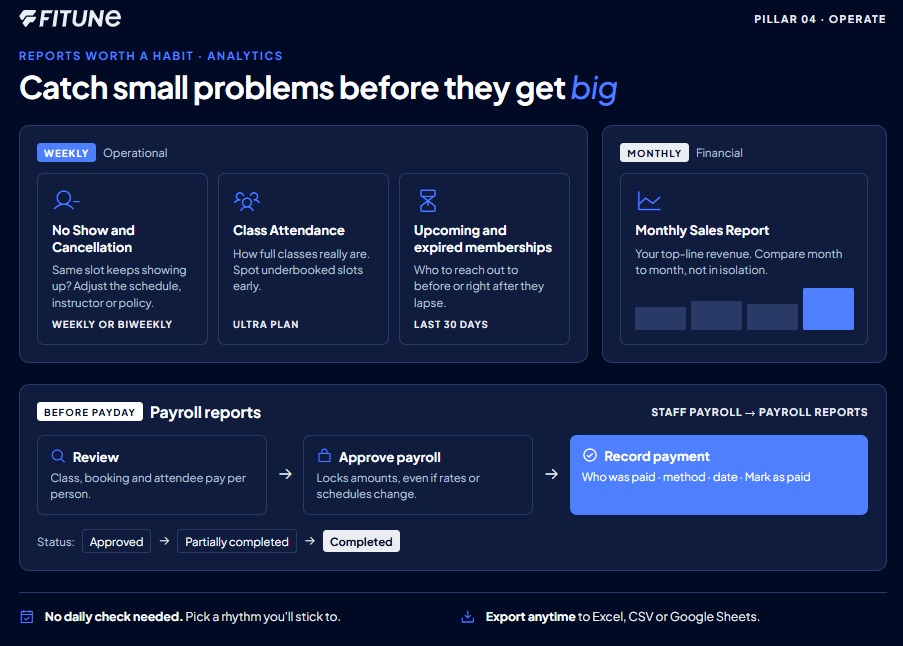
- Monthly Sales Report — monthly. Your top-line view of revenue for the period. This is the one number most studios check first, and it's worth comparing month to month rather than looking at it in isolation.
- No Show and Cancellation Report — weekly or biweekly. If a particular class or time slot keeps showing up here, that's often a sign something needs adjusting — the schedule, the instructor, or the cancellation policy itself.
- Class Attendance — weekly. Shows how full your classes actually are, which is useful for spotting underbooked slots early. This report (along with Class Performance) is available on the Ultra plan.
- Upcoming Membership Expirations and Expired Memberships (-30 days) — weekly. These two together give you a running list of clients worth reaching out to before or right after they lapse, rather than finding out weeks later that a client quietly stopped coming.
Don't forget payroll reports
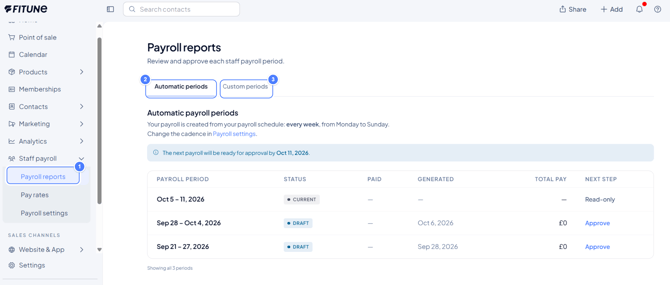
If you pay your team through Fitune, give Staff payroll > Payroll reports its own spot in that rhythm, usually right before payday.
Review, Approve, and Pay Your Payroll Reports covers the full flow:
- Reviewing each staff member’s class, booking and attendee pay
- Approving to lock the amounts
- Recording payment once your team is paid
Approve: After you review the numbers, click Approve payroll. This locks the amounts so they can’t shift if a schedule or a pay rate changes afterward.
Record payment: After you pay your team:
- Open the approved report and click Record payment.
- Select who was paid.
- Choose the payment method.
- Confirm the date.
- Click Mark as paid.
As each person is marked as paid, the report’s status moves from Approved to Partially completed to Completed.
If your studio recently added new team members, pair this habit with checking that everyone’s account and role are set up correctly. That’s covered separately in How to Give Access to Your Team / Trainers / Staff.
None of these need a daily check. The point is to pick a rhythm you’ll actually stick to: weekly for the operational ones, monthly for the financial picture. That beats opening Analytics only when something feels off.
Frequently asked questions
▶ Do I need to check every report Fitune offers?
No — the reports above cover the habits most studios get the most value from. The full list is in the Fitune Reports hub article if you want to explore further.
▶ Are Class Attendance and Class Performance available on every plan?
No, both are part of the Ultra plan. If you're on a different plan, you'll still have access to the other reports mentioned here.
▶ Can I export these reports?
Yes — reports across Fitune support exporting to Excel, CSV, or Google Sheets, and most can be filtered by client, date, service, trainer, or location.
▶ What happens if I approve a payroll report by mistake?
Approving locks the amounts so they won't shift if rates or schedules change later — if something needs correcting, it's worth checking with your team on the best way to handle it before recording any payments.