
This counts toward the Convert pillar of your Fitune Health Score. A generic "10% off" rarely moves someone who's never set foot in your studio. What works is a specific, low-commitment first offer built for people who are still deciding — something small enough to try without a second thought, but real enough to get them through the door (or into their first online class).
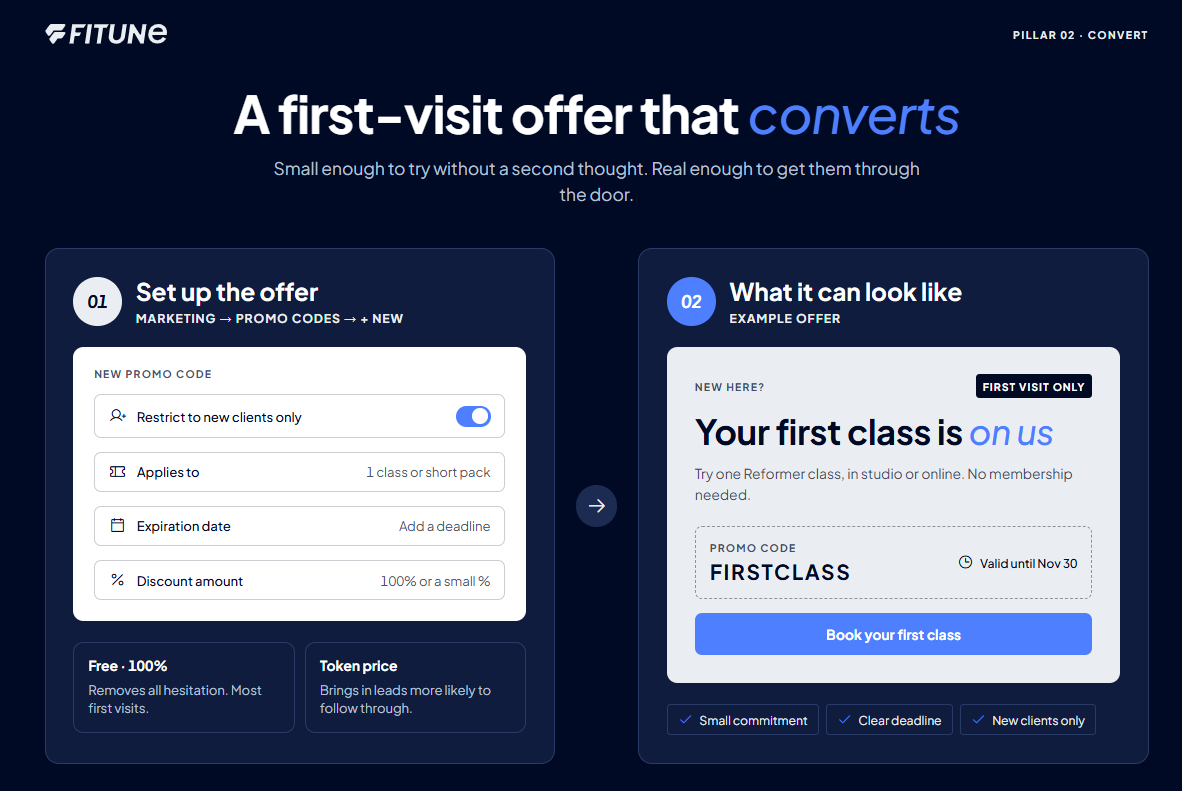
What makes a first-visit offer actually work
Three things help an offer get used instead of ignored:
- Keep the commitment small. A single class or a short pack works better than a full membership. You’re asking for a first “yes,” not a long-term decision.
- Add a deadline. An offer with no end date feels optional, so people put it off. A date makes it worth acting on now.
- Limit it to people who haven’t bought from you before. This keeps it a real first-visit incentive, and not a discount your regulars start expecting too.
Free or discounted? It’s your call, and both work:
- Free removes all hesitation and brings in the most people.
- A small paid amount (even a token one) tends to attract people who are more likely to follow through.
Neither is wrong. It depends on whether you want more first visits right now or more serious leads.
Setting it up as a self-serve offer (promo code)
This works best for people who find you online, through your website, Instagram, or a link you share. To create it:
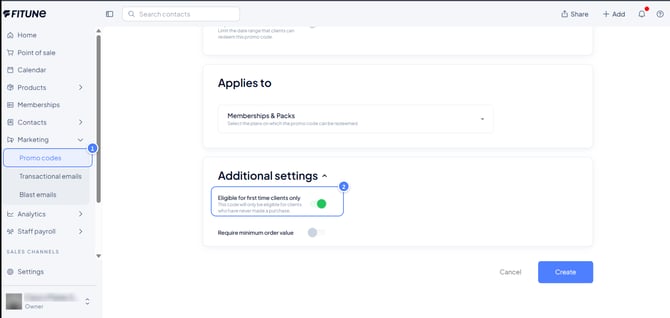
- Go to Marketing → Promo Codes → + New Promo Code.
- Turn on Restrict to new clients only, so only first-timers can use it.
- In Applies To, choose a single class or a short pack, not a full plan.
- Set an Expiration Date.
- Choose the Discount Amount: 100% for a free offer, or a smaller percentage if you want a token payment.
For every field on this screen, including how clients redeem the code and how to limit the number of uses, see How to Create Promo Codes.
If you also want more people to find this offer, the guide on setting up online lead capture covers that separately (link pendente — esse artigo ainda não está publicado).
Setting it up in person (for walk-ins and referrals)
Not every new client comes through a link. Some walk in, and some are referred by a friend. In these cases, a member of your team can sell the offer right at the Point of sale, the part of Fitune you use to charge clients in person:
-
- Open Point of sale from the left menu.
- Select the client. If they’re new, create their profile first.
- Add the class, pack, or short plan you want to offer.
- Choose the payment method. Select Free to offer the first visit at no cost. If you’re offering a paid first visit instead, enter the reduced amount.
- Complete the sale.
Read more in: Intro to the Point of Sale (POS)
Setting it up a membership as an intro offer
You can create a membership that works as an introduction to your studio. It suits holiday promotions and converting new leads.
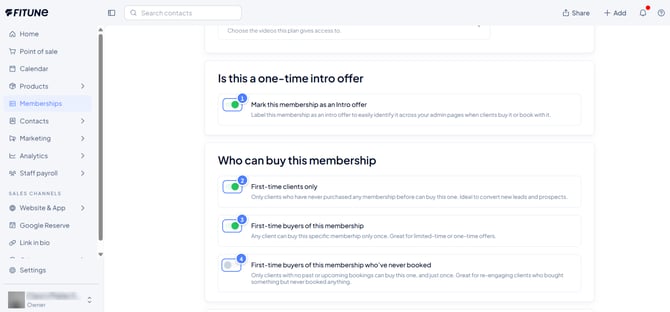
When you create or edit a membership, scroll to Is this a one-time intro offer and Who can buy this membership. Each option there is an on/off button:
- Enable Mark this membership as an Intro offer to label it across your admin pages. After a client’s one-time payment, it’s also flagged on the calendar, so your team can offer a renewal or an upgrade.
- Under Who can buy this membership, choose who can buy it:
- First-time clients only: clients who have never purchased any membership or plan. Ideal for converting new leads.
- First-time buyers of this membership: any client, but only once. Works well for holiday promotions.
- First-time buyers of this membership who’ve never booked: clients with no purchase history and no past or upcoming bookings, free ones included, and only once. Best for people completely new to your studio.
The membership stays available for purchase after your offer ends. If you don’t want clients to buy it afterwards, make it unavailable yourself.
You’ll find the full steps for this screen in Add a Membership, Pack, or Plan Manually. That article also covers other payment methods and how to schedule when a plan becomes active.
Frequently asked questions
▶ Should my new-client offer be completely free, or should I charge something?
Both work. Free tends to bring in more people; a small charge tends to bring in people slightly more likely to follow through. Pick based on whether you're prioritizing volume or intent right now.
▶ What's the difference between the promo code option and the manual option?
The promo code is self-serve — a client finds it and redeems it themselves during checkout, which is ideal for anyone coming from your website or social media. The manual option is added by your team directly to a specific client's account, which is better for walk-ins, referrals, or anyone you're signing up in person.
▶ Can I use both at the same time?
Yes — many studios run the promo code for their online audience and use the manual option for people who show up or get referred in person. Just make sure both point to the same kind of small, low-commitment offer so the experience feels consistent.
▶ How long should the offer stay valid for a given client?
That's your call, but a short window (days, not months) tends to work best — it nudges people to act rather than "save it for later."